Your clipboard, reimagined.
A lightweight, keyboard-driven clipboard manager for Windows. Built for speed. Designed for flow.
Free & open source. GNU licensed.
Features
Everything you need, nothing you don't.
WinPaste strips away the bloat. Every feature earns its place through daily use.
Lightweight & fast
Built with Rust. Under 10 MB memory footprint. Instant cold start, zero input lag — always responsive, never bloated.
Lightweight Mode
Toggle record-only mode from the tray: the main window and WebView are released while WinPaste keeps capturing in the background with zero windows. Restore the panel whenever you need it.
Instant search
Hit Ctrl+F or / to focus the search bar. Filter by content, type, or tags. Results update as you type — no delay.
Smart cursor tracking
Uses UIAutomation to detect cursor position even in Chrome, VS Code, and Electron apps where traditional APIs fail. The panel always appears exactly where you need it.
Multi-format capture
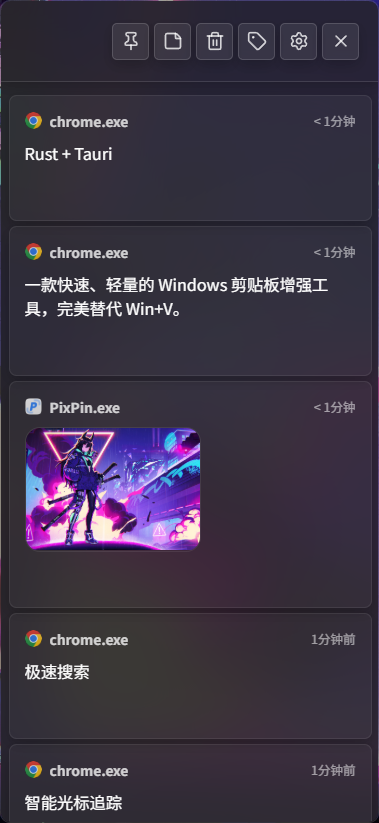
Captures plain text, rich HTML, images, file paths, and GIFs. Each entry shows its source application so you know exactly where it came from.
Privacy protection
Auto-detects and masks phone numbers, ID cards, emails, and passwords. Add custom regex rules. Sensitive data is AES-encrypted at rest.
Sequential paste mode
Queue up multiple items and paste them one by one with a single hotkey. Perfect for filling forms or copying structured data.
Pin & sticky mode
Pin frequently-used items to the top. Sticky mode lets you detach entries as floating windows that stay visible while you work in other apps.
Fluent Design theme
Dark, light, or system-matched. Windows 11 Mica blur & Windows 10 acrylic. Adjustable font sizes, compact mode, and border toggles.
Captures
Every format you copy.
How it works
Three steps, zero friction.
Copy anything, anywhere
WinPaste silently records every clipboard change in the background. Text, images, files, code — it all lands in your history with the source app tagged.
Press the shortcut
Hit Win+V (or your custom hotkey). The panel appears right at your cursor — even inside Chrome, VS Code, or Excel. Your current app keeps focus. No interruption.
Select and paste
Navigate with arrow keys, type to search, press Enter to paste. Or use Ctrl+Shift+0-9 to quick-paste your 10 most recent items without opening the panel.
Rust-powered. Reliable by design.
WinPaste's core engine is built in Rust — memory-safe, no GC pauses. A low-level WH_KEYBOARD_LL hook combined with WS_EX_NOACTIVATE window styling runs fire-and-forget; heavy lifting is dispatched to async Tokio workers so the input pipeline never stalls.
A Single Source of Truth (SSOT) state machine eliminates the race conditions that plague clipboard managers — no more stuck modifier keys, no more random keyboard failures.
Ready to upgrade your clipboard?
Free, open source, Windows 10 and 11. No sign-up, no telemetry.
Version v1.9.3 · Windows 10/11 · x64 · ~4 MB